
Screenshot by Dillon Rosenblatt

Audio By Carbonatix
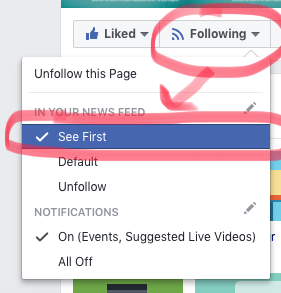
Facebook has made a recent update to show mostly posts from friends and family in your newsfeed and a lot fewer posts from websites and professional pages, like ours at Phoenix New Times. Here is a step-by-step guide on how to continue seeing the stories, pictures, videos, etc. we post every day.
Here’s how to stay up-to-date on New Times posts.
Screenshot by Dillon Rosenblatt
1. If you don’t already like/follow us, make sure to do so.
2. Once you hit follow — you’ll know because it will say “following” — highlight over the follow button until options appear. Click “see first” and if you want to be the first to know when we go live on Facebook, feel free to click “on” under notifications.
If you prefer to use Facebook and read our posts from mobile, here’s how to do those steps from the phone.
1. Head over to the Facebook app, and hit the three vertical lines on the bottom right corner. Scroll all the way down until you see Settings.
2. Click Settings and then hit “News Feed Preferences” (seen below).
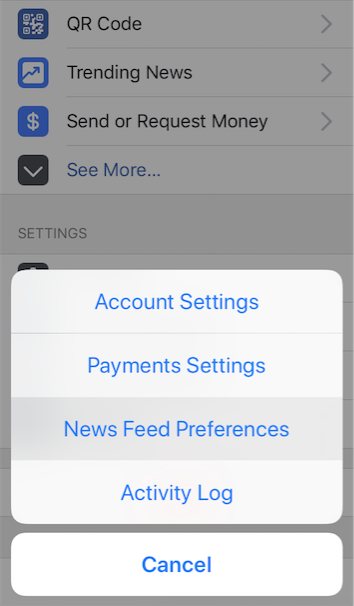
How to access your News Feed Preferences from mobile Facebook.
Screenshot by Dillon Rosenblatt
3. On the next screen you will see a few options to select from, choose “Prioritize who to see first.” All of your Facebook friends and pages you like will appear here. Find Phoenix New Times and tap our red and white logo. Once you do this a blue star will appear on our logo. When you see that …
4. Click Done on the upper right corner of the screen and voila!
Now you will be up-to-date on our stories and happenings in the Valley, while continuing to support local journalism.
We thank you.